


Container Security Software: Build vs Buy in 2026
Your engineers are drowning in CVE alerts. The scripts they wrote two years ago to harden images are now a second codebase nobody owns. You have a compliance audit coming up and no clean audit trail. That’s the real conversation happening in security and engineering leadership right now. The question isn’t whether you need container security software – it’s whether you build it yourself or buy it.
Both paths are legitimate. Neither is free. This post gives you the framework to choose honestly.
Container security build vs buy: split view of chaotic homegrown tooling on the left versus a clean automated vendor pipeline on the right
The Hidden Cost of Building It Yourself
The “build” option feels cheap on day one. You write a shell script. You pin base images. You configure a scanner. Done.
Six months later, the script has 400 lines of undocumented logic. Three engineers have touched it. One left the company. Two new registries got added to the stack. Upstream base images update weekly and your script isn’t keeping up. A new compliance audit just asked for evidence of automated vulnerability remediation – and you realize your tooling produces no audit trail.
This is not a hypothetical. It is the normal trajectory of homegrown container hardening.
The hidden costs compound fast:
- Engineer time diverted from product work to image maintenance
- Alert fatigue as scanners flag CVEs that your scripts should have already removed
- Coverage gaps as image count grows faster than your tooling can scale
- Compliance overhead assembling manual evidence for audits
Building your own container security toolchain can work for a small, stable image catalog. Once that catalog grows or your compliance requirements sharpen, maintenance burden typically exceeds the initial savings.
The Comparison: Build vs Buy
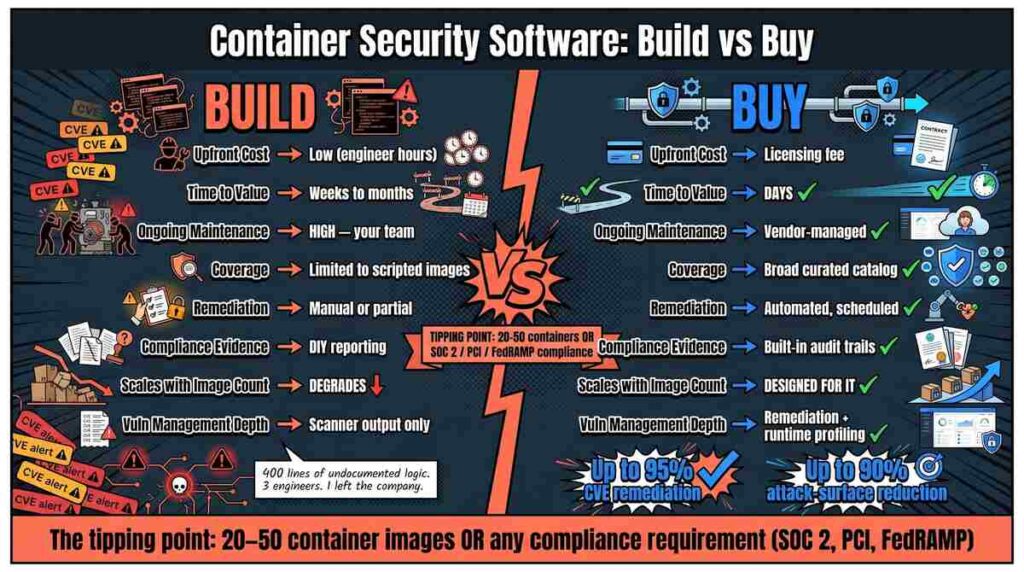
Build vs buy comparison infographic: 8-factor side-by-side breakdown with tipping point at 20-50 containers or SOC 2/PCI/FedRAMP compliance
Use this table to evaluate honestly. Fill in your own numbers.
| Factor | Build | Buy |
| Upfront cost | Low (engineer hours) | Licensing fee |
| Time to value | Weeks to months | Days |
| Ongoing maintenance | High – your team owns it | Vendor-managed |
| Coverage breadth | Limited to images you’ve scripted | Broad curated catalog |
| Automated remediation | Manual or partial | Automated, scheduled |
| Compliance evidence | DIY reporting | Built-in audit trails |
| Scales with image count | Degrades | Designed for it |
| Vulnerability management depth | Scanner output only | Remediation + runtime profiling |
The tipping point for most teams is around 20-50 container images or a compliance requirement like SOC 2, PCI, or FedRAMP. Below that threshold, scripted hardening may be sufficient. Above it, the maintenance math usually favors buying.
Before and After: What the Two Paths Actually Look Like
Before (building it): Security engineer spends Monday re-pinning base images. Someone files a ticket because the latest Alpine update broke a dependency. Wednesday, a scanner runs and surfaces 300 CVEs across 40 images. Triage takes two days. Half are already patched in the upstream but your script hasn’t pulled the update. Compliance audit in two weeks and you’re exporting CSV reports by hand.
After (buying): Images are pulled from a vendor-managed catalog of hardened, near-zero-CVE images. Your pipeline doesn’t change. When a new CVE drops, automated vulnerability remediation runs before you’ve even read the advisory. Runtime profiling tells you which packages are actually loaded at runtime so you can remove the rest. The compliance report is a button click.
The “after” picture assumes you’ve chosen the right tool and integrated it properly. It’s not magic. But it is a fundamentally different maintenance posture.
How to Run the Decision
Answer these four questions with your team:
- How many container images do you maintain today, and how fast is that number growing? More than 30 active images and growing means build costs scale linearly with your catalog.
- What does a missed CVE cost you? If you’re in a regulated industry or handle sensitive data, a single exploited vulnerability in a running container may cost more than a year of vendor licensing.
- Who owns the tooling? If the answer is “whoever has bandwidth,” you’ve already identified a risk. Vendor platforms have SLAs; internal scripts don’t.
- What does your compliance timeline look like? Assembling DIY evidence for hardened container images across a quarterly audit cycle is an underestimated burden. Buyers get this for free.
Frequently Asked Questions
Does building your own tooling ever make sense in 2026?
Yes, for small, stable image catalogs with no external compliance obligations and a dedicated security engineer who owns the tooling long-term. Most teams that fit this description six months ago don’t fit it today. Image counts and compliance requirements both trend upward.
What is runtime profiling and why does it matter for container security?
Runtime profiling captures which packages, binaries, and libraries a container actually uses during execution. You can then remove everything else. This attack-surface reduction is difficult to achieve with static analysis alone and nearly impossible to maintain at scale with homegrown scripts. Tools like RapidFort automate this via a runtime bill of materials (RBOM) that feeds directly into hardening decisions.
How quickly can you actually get to near-zero CVEs?
With a curated catalog of drop-in hardened images, teams typically see up to 95% CVE remediation and up to 90% attack-surface reduction without any code or pipeline changes. DIY approaches rarely reach those numbers consistently because maintaining coverage across every image every week is an unsustainable manual effort.
What about open-source scanners – can’t those cover the gap?
Scanners identify vulnerabilities. They don’t fix them. Automated remediation and hardening are a separate capability layer. Open-source scanners are an important input, but they’re the start of a workflow, not the end of one. Relying on scanners alone leaves the remediation loop manual, which is where most teams are still losing time.
The Cost of Staying Where You Are
The scripts you have today will not get better on their own. They accumulate exceptions, break on upstream changes, and produce no audit evidence. Every month you run homegrown tooling against a growing image catalog is a month of compounding technical debt in a part of your stack that attackers actively target.
The build vs buy question is not really about cost in isolation. It’s about where you want your engineers’ attention and what level of risk your organization can carry. Homegrown hardening carries both a maintenance cost and a coverage cost – and the coverage cost is the one that shows up in incident reports.
Compliance timelines don’t wait for tooling to mature. Audit cycles, certification renewals, and customer security questionnaires all run on fixed schedules. Teams that delay the decision don’t save money; they compress the timeline and do the same work in less time, usually at higher stress.
The teams that made this call early are now running faster, maintaining less, and walking into audits with evidence already prepared.
