
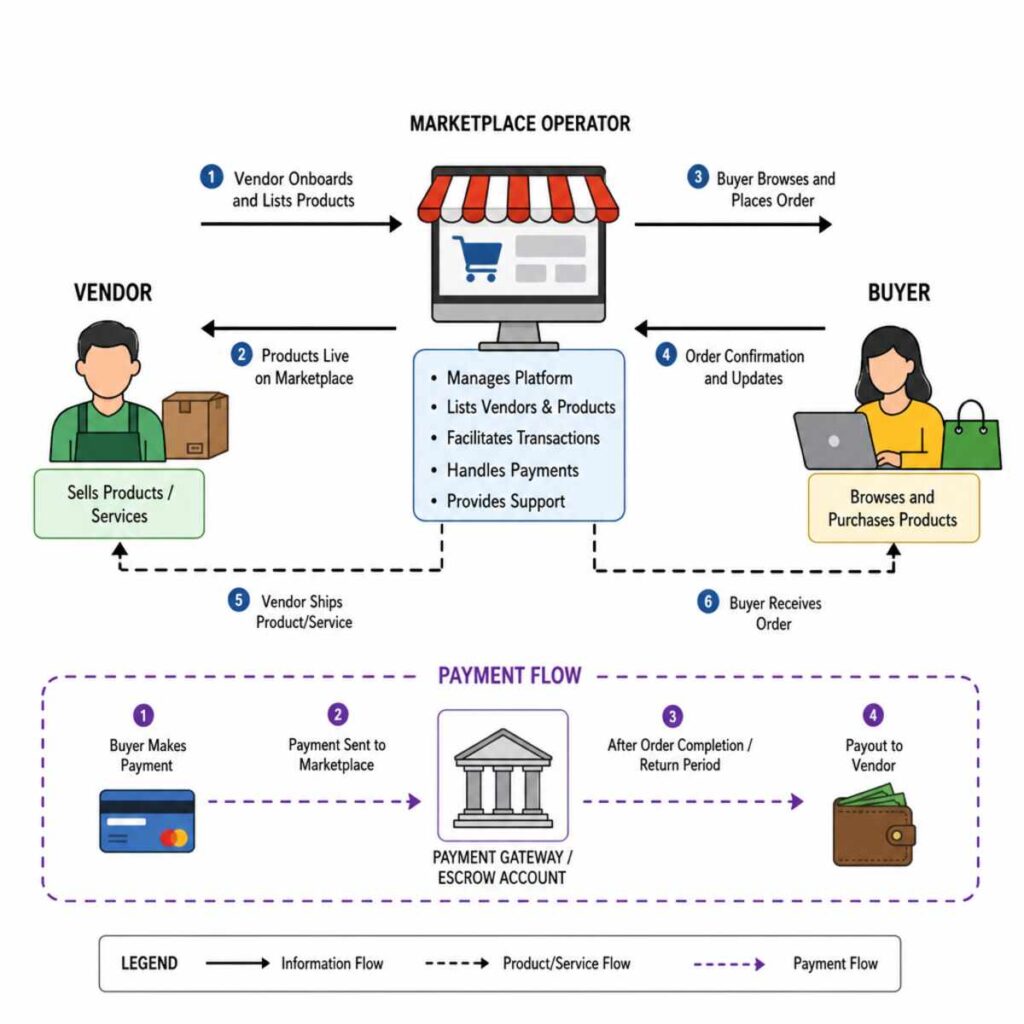
Choosing marketplace software is not like choosing a simple online store builder. A standard ecommerce site has one seller, one catalog, one fulfillment process, and one set of margins. A marketplace has many sellers, competing incentives, split payments, vendor onboarding, disputes, commissions, product approvals, shipping complexity, and a far greater need for operational control. Get the Best information about CS-Cart Multi-Vendor.
That is why self-hosted marketplace software still matters. While hosted SaaS tools can help founders move quickly, self-hosted options give you more control over data, infrastructure, customization, compliance workflows, and long-term unit economics. The tradeoff is clear: you gain ownership, but you also inherit responsibility.
For most teams, the “best” choice is not the platform with the longest feature list. It is the one that fits your marketplace model, technical capacity, budget, payment flow, vendor experience, and growth plan. A founder building a niche handmade-goods marketplace does not need the same architecture as a B2B procurement network, a headless composable commerce team, or a regional grocery marketplace with complex delivery rules.
Below is a practical, plain-English comparison of the strongest self-hosted marketplace options, including turnkey platforms, WordPress-based marketplace plugins, extension-based ecommerce platforms, and developer-first frameworks.
The quick answer: which self-hosted marketplace option fits which use case?
If you want a fast shortlist, start here:
- CS-Cart Multi-Vendor is a strong fit for teams that want a purpose-built, self-hosted marketplace platform with vendor management, storefront tools, and marketplace operations built into the core rather than bolted on later. CS-Cart describes Multi-Vendor as a standalone self-hosted ecommerce platform for marketplace management, with vendor panels, storefront control, and scaling through vendors, products, regions, storefronts, and custom functionality. (cs-cart.com)
- Yo!Kart is a practical option for founders who want white-label, self-hosted multi-vendor marketplace software with a broad feature set and vendor-facing marketplace workflows handled by the vendor’s team. Yo!Kart positions itself as a self-hosted, white-label multivendor ecommerce marketplace platform for startups and enterprises. (yo-kart.com)
- WooCommerce plus Dokan, WCFM Marketplace, WC Vendors, or MultiVendorX is often best for WordPress-first teams, content-led brands, and MVPs that need low-cost flexibility. WooCommerce is an open-source commerce platform for WordPress, and the WordPress plugin ecosystem includes multivendor tools such as Dokan, WCFM Marketplace, WC Vendors, and MultiVendorX. (woocommerce.com)
- Adobe Commerce or Magento Open Source plus a marketplace extension is best for technically mature teams that need advanced catalog, promotion, B2B, or integration depth and can support Magento-grade development. Webkul’s Magento marketplace module is designed to convert a Magento store into a multi-vendor marketplace with seller collections, order and shipping management, ratings, feedback, and commissions. (store.webkul.com)
- Bagisto plus its Multi Vendor Marketplace extension is attractive for Laravel teams that want open-source ecommerce foundations with a paid marketplace layer. Bagisto’s documentation lists a paid Multi Vendor Marketplace option that lets multiple vendors register, sell products, and manage stores independently. (docs.bagisto.com)
- Spree Commerce is one of the more compelling developer-friendly open-source marketplace choices, especially for headless builds. Spree’s marketplace materials describe vendor onboarding, commission management, multi-vendor checkout, order splitting, Stripe Connect or Adyen payouts, REST APIs, a TypeScript SDK, and a Next.js storefront. (spreecommerce.org)
- Vendure, Medusa, and Saleor are better viewed as composable commerce frameworks rather than out-of-the-box marketplace builders. Vendure has official multi-vendor marketplace guidance built around channels and an example plugin, Medusa provides a marketplace recipe for building vendor models, and Saleor promotes marketplace builds through its GraphQL API rather than as a turnkey marketplace package. (docs.vendure.io)
The rest of this guide explains how to compare these ecommerce platforms intelligently, so you do not get trapped by a beautiful demo that becomes a difficult business to operate.
What “self-hosted marketplace software” really means
Self-hosted marketplace software is software you run on infrastructure you control. That infrastructure might be a dedicated server, cloud virtual machine, containerized environment, managed Kubernetes cluster, private cloud, or a hosting provider configured by your technical team.
In practical terms, self-hosted usually means you have more control over:
- Where customer, vendor, order, and payment-related data lives
- How the marketplace is customized
- Which integrations are installed
- How hosting resources scale
- How security updates are applied
- How the checkout, vendor dashboard, and admin workflows are modified
- How deeply your marketplace connects to ERP, CRM, logistics, analytics, tax, search, and accounting systems
But self-hosted does not mean “free from operational burden.” You or your team must care about uptime, patching, backups, performance, database health, server hardening, application monitoring, plugin compatibility, and release management.
A self-hosted platform is a good choice when control is strategically valuable. It is a risky choice when the team wants SaaS-level convenience but does not have the budget, discipline, or technical support to maintain production software.
The core marketplace features to compare first
Before comparing logos, compare marketplace mechanics. The best self-hosted marketplace software should help you manage the relationship between three parties: the operator, vendors, and buyers.
Vendor onboarding
A marketplace lives or dies by supply. Look for:
- Vendor registration forms
- Admin approval workflows
- Seller verification options
- Vendor profile pages
- Storefront or microsite pages
- Role-based permissions
- Vendor documents or compliance fields
- Bulk import options
- Seller invitations
A tool that looks impressive on the buyer side can still fail if onboarding vendors is slow, confusing, or too manual.
Catalog ownership and product approval
Multi-vendor catalogs can get messy quickly. You need to know whether vendors can create products freely, whether products require approval, whether multiple vendors can sell the same item, and how duplicates are handled.
For product marketplaces, catalog governance is not an admin detail. It affects SEO, conversion, customer trust, merchandising, and support volume.
Commission logic
Basic marketplace software lets you charge a flat percentage. Better software lets you set different commissions by vendor, category, product, subscription tier, shipping fee, promotion, or business model.
Dokan, for example, documents multiple commission types, including global, vendor-specific, category-specific, and product-specific commission controls. (dokan.co)
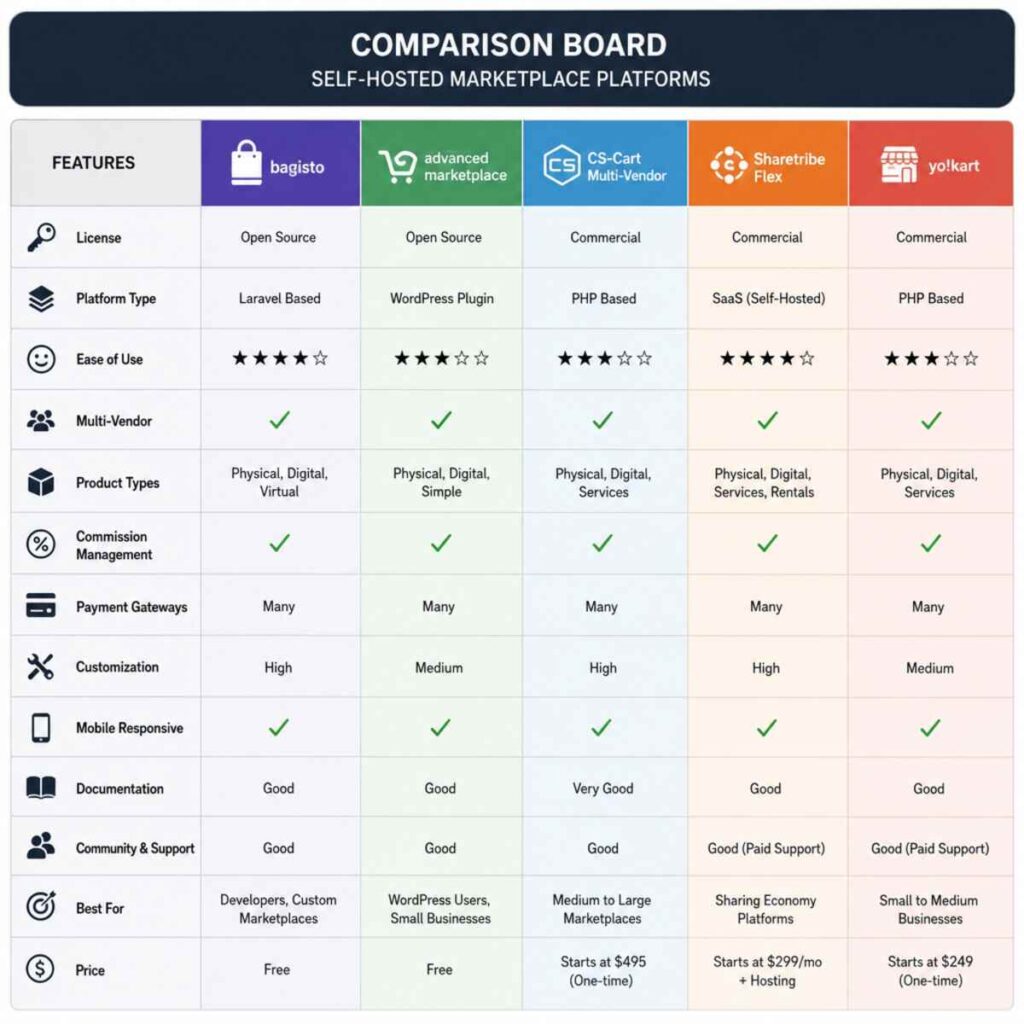
Vendor payouts and payment splitting
Payouts are often where marketplace dreams meet operational reality. You need to understand whether the platform supports:
- Manual payout requests
- Scheduled payouts
- Split payments
- Vendor balances
- Refund adjustments
- Chargeback handling
- Tax reporting support
- Integration with Stripe Connect, PayPal, Adyen, bank transfer, or regional payment providers
Spree Commerce, for instance, describes multi-vendor order splitting and vendor payout workflows using Stripe Connect or Adyen for Platforms in its marketplace materials. (spreecommerce.org)
Shipping and fulfillment
Physical product marketplaces need flexible shipping rules. Ask whether each vendor can define shipping methods, shipping zones, shipping rates, pickup options, delivery windows, handling fees, tracking numbers, and return policies.
If you sell digital goods, services, rentals, bookings, or courses, the “shipping” question becomes a fulfillment question. Can the platform handle the actual unit of value your marketplace sells?
Disputes, refunds, returns, and support
A marketplace operator is not just a storefront owner. You are a trust broker. You need clear workflows for refunds, returns, disputes, messaging, support tickets, seller reviews, buyer reviews, and policy enforcement.
If the software does not support these workflows natively, you will need to build them, integrate them, or handle them manually.
SEO and content flexibility
Marketplace SEO is different from store SEO. You may need indexable vendor pages, category pages, product pages, city pages, comparison pages, collection pages, and editorial content. WordPress-based builds are attractive here because content and commerce can live close together, but a headless platform can also perform extremely well if your team knows how to design SEO-friendly front ends.
Extensibility and ecosystem
Self-hosted software is only as useful as the ecosystem around it. Compare:
- Extension marketplace depth
- API quality
- Webhook support
- Theme flexibility
- Developer documentation
- Community activity
- Agency availability
- Upgrade path
- Plugin compatibility
A platform can be cheaper on day one but more expensive by month twelve if every useful feature requires fragile custom development.
Option 1: CS-Cart Multi-Vendor
CS-Cart Multi-Vendor is one of the most recognized purpose-built self-hosted marketplace software options. Its biggest advantage is that it was designed specifically around marketplace administration rather than adapting a single-seller store into a multi-seller environment.
CS-Cart’s own materials describe Multi-Vendor as a self-hosted marketplace platform with a backend, storefront, vendor panel, vendor micro-stores, product and order management, and support for scaling through vendors, products, storefronts, regions, and custom functionality. (cs-cart.com)
Best for
CS-Cart is especially strong for:
- Product marketplaces
- B2C and B2B multi-vendor commerce
- Teams that want a ready marketplace admin experience
- Operators who want more built-in marketplace functionality than a plugin stack usually offers
- Founders who want to avoid building vendor management from scratch
- Businesses that prefer licensed software over assembling many plugins
Strengths
CS-Cart’s biggest strength is operational completeness. The platform includes vendor-specific marketplace concepts, which can shorten the path from idea to functioning marketplace.
Notable advantages include:
- Purpose-built vendor management
- Vendor panels
- Admin moderation workflows
- Vendor storefront concepts
- Commission and marketplace monetization features
- Multi-storefront options in higher editions
- A mature marketplace positioning
- Self-hosted infrastructure control
CS-Cart can be a good fit when you want marketplace software that behaves like marketplace software from the first login.
Tradeoffs
The main tradeoff is that CS-Cart is its own ecosystem. That can be a positive if you want a cohesive product, but it can be a limitation if your team prefers a more mainstream developer stack such as WordPress, Laravel, Ruby on Rails, Node.js, or a headless React architecture.
You should also evaluate:
- License costs
- Add-on costs
- Developer availability in your region
- Theme customization flexibility
- Upgrade complexity after custom modifications
- Whether your exact payment, tax, and logistics integrations are available
Bottom line
CS-Cart Multi-Vendor belongs near the top of any serious comparison of the best self-hosted marketplace software. It is a practical choice for operators who want marketplace functionality out of the box and are comfortable working inside a specialized platform ecosystem.
Option 2: Yo!Kart
Yo!Kart is a white-label, self-hosted multivendor marketplace platform aimed at founders, startups, and enterprises that want a ready-made marketplace product rather than a developer framework. Yo!Kart promotes self-hosted ecommerce deployment, white-label ownership, installation support, and a broad feature set for multi-vendor ecommerce marketplaces. (yo-kart.com)
Best for
Yo!Kart is worth considering if you want:
- A packaged multi-vendor ecommerce marketplace
- White-label presentation
- A vendor that provides installation and support
- Faster launch than a custom build
- A feature-rich starting point for physical product marketplaces
- A commercial software relationship rather than a purely open-source community model
Strengths
Yo!Kart’s appeal is simplicity from a buying perspective. Instead of choosing a base ecommerce engine, finding a marketplace extension, testing plugin compatibility, and hiring multiple specialists, you buy a marketplace product.
That can be useful for non-technical founders who know their niche and business model but do not want to architect the platform from scratch.
Potential strengths include:
- White-label positioning
- Self-hosted deployment
- Vendor-side installation assistance
- Multi-vendor workflows
- A marketplace-first feature list
- Support for multiple ecommerce niches
Tradeoffs
The same simplicity can become a constraint if you want deep, unusual customization. Before choosing Yo!Kart, ask how custom features are handled, whether you can work with your own developers, how source code access works, and what happens when you need integrations outside the platform’s standard roadmap.
You should clarify:
- Source code access and license terms
- Custom development process
- Upgrade policy after customization
- Hosting requirements
- API flexibility
- Long-term support costs
- Design flexibility
Bottom line
Yo!Kart is a strong candidate for founders who want a self-hosted, white-label marketplace package and prefer guided implementation over assembling an open-source stack. It is less ideal for teams that want complete architectural freedom from day one.
Option 3: WooCommerce with Dokan
WooCommerce is one of the most flexible ecommerce platforms because it sits on WordPress, and WordPress is still a natural home for content-heavy businesses. WooCommerce describes itself as an open-source commerce platform for WordPress that gives store owners control over checkout, data, and costs. (woocommerce.com)
Dokan is one of the best-known WooCommerce multivendor plugins. WordPress.org lists Dokan as a WooCommerce multivendor marketplace solution, and Dokan’s own feature page highlights vendor management, multiple commission types, vendor dashboards, withdrawals, order management, frontend variable products, store pages, and payment gateway support. (wordpress.org)
Best for
WooCommerce plus Dokan is a good fit for:
- WordPress-first founders
- Content-led marketplaces
- Niche product marketplaces
- Smaller and mid-sized MVPs
- Teams with WordPress development experience
- Businesses that want to combine blogging, SEO, landing pages, and commerce
- Founders who want a large pool of developers and plugins
Strengths
The biggest advantage is ecosystem. WordPress and WooCommerce have enormous theme, plugin, developer, and content-management flexibility. If your marketplace depends on education, editorial SEO, creator stories, vendor interviews, local landing pages, or community content, WooCommerce is hard to ignore.
Dokan adds marketplace-specific layers such as vendor dashboards, commissions, withdrawals, vendor stores, and order management. That makes it easier to build a marketplace without starting from a blank WordPress install.
Strengths include:
- Familiar WordPress admin experience
- Strong content marketing capabilities
- Large plugin ecosystem
- Relatively fast MVP development
- Vendor-facing features through Dokan
- Flexible design options through WordPress themes and builders
- Broad payment gateway options through WooCommerce
Tradeoffs
WooCommerce marketplace builds can become plugin-heavy. Every additional plugin adds potential performance, compatibility, security, and maintenance concerns. A simple WooCommerce store can run beautifully, but a marketplace with vendor dashboards, split payouts, subscriptions, bookings, memberships, shipping rules, analytics, and SEO plugins can become complex.
You should evaluate:
- Plugin compatibility
- Hosting quality
- Page speed
- Checkout performance
- Database growth
- Admin usability
- Security maintenance
- Whether your developers understand WooCommerce hooks and WordPress architecture
Bottom line
WooCommerce plus Dokan is one of the most accessible ways to launch a self-hosted marketplace, especially when content and SEO matter. It is not the cleanest choice for every high-scale or highly custom marketplace, but it can be an excellent starting point when used with discipline.
Option 4: WooCommerce with WCFM Marketplace, WC Vendors, or MultiVendorX
Dokan is not the only WooCommerce route. WCFM Marketplace, WC Vendors, and MultiVendorX are also common choices for turning WooCommerce into a multivendor platform.
WCFM Marketplace’s WordPress.org listing describes it as a WooCommerce multivendor marketplace plugin with frontend vendor dashboards, commission and payout rules, Stripe split payments, vendor shipping, vendor registration, store reviews, refund workflows, support tickets, store SEO, and related modules. (en-gb.wordpress.org)
WC Vendors is listed as a WooCommerce multivendor and marketplace plugin, while WordPress.org’s multivendor category lists Dokan, WC Vendors, WCFM Marketplace, and MultiVendorX among available multivendor marketplace plugins. (wordpress.org)
Best for
These plugins are worth comparing if:
- You already know WooCommerce is your base platform
- You want to compare pricing and feature depth against Dokan
- You need specific vendor dashboard, shipping, membership, or payout features
- You want a low-cost or modular marketplace setup
- You are comfortable testing plugin combinations before launch
Strengths
WCFM in particular has historically appealed to builders who want a broad feature set and frontend vendor management. WC Vendors often appeals to teams that want a focused WooCommerce multivendor plugin. MultiVendorX is another option for teams evaluating the WordPress marketplace ecosystem.
The biggest advantage of comparing these plugins is that you can choose based on exact workflow needs rather than assuming one WooCommerce marketplace plugin is automatically best.
Compare them on:
- Vendor dashboard usability
- Commission options
- Payout workflows
- Shipping controls
- Refund and return handling
- Single product multi-vendor support
- Booking or appointment compatibility
- Subscription and membership compatibility
- Support quality
- Add-on pricing
Tradeoffs
The risks are similar to Dokan: plugin dependency, performance tuning, upgrade conflicts, and the need for a WordPress-savvy development team. You should build a staging environment and test every critical workflow before onboarding vendors.
Do not choose a WooCommerce marketplace plugin solely from screenshots. Create test vendors, test products, test refunds, test split payments, test tax calculations, and test customer emails.
Bottom line
WooCommerce multivendor plugins are best when you want flexibility, content power, and manageable launch costs. They are less ideal if you want a deeply customized marketplace architecture without WordPress constraints.
Option 5: Adobe Commerce or Magento Open Source with a marketplace extension
Magento-based builds are not the easiest path, but they can be powerful. Magento Open Source and Adobe Commerce ecosystems are known for advanced ecommerce use cases, complex catalogs, promotions, customer groups, integrations, and B2B-style workflows.
Magento does not become a marketplace by default. You typically add marketplace functionality through a third-party extension or custom development. Webkul’s Magento and Magento 2 marketplace extensions are designed to convert Magento stores into multi-vendor marketplaces with seller product collections, order and shipping management, feedback, ratings, commissions, seller profiles, approval workflows, and related marketplace features. (store.webkul.com)
Best for
A Magento-based marketplace can make sense for:
- Established ecommerce companies expanding into marketplace models
- Complex product catalogs
- B2B marketplaces
- Multi-store, multi-region, or multi-brand commerce
- Teams with existing Magento infrastructure
- Businesses with strong development budgets
- Operators who need deep integrations with ERP, PIM, CRM, warehouse, or tax systems
Strengths
Magento’s strength is ecommerce depth. If your marketplace needs complex pricing, product attributes, promotions, customer segmentation, integrations, or enterprise-style workflows, a Magento foundation can be valuable.
Potential advantages include:
- Strong catalog architecture
- Extensive extension ecosystem
- Enterprise development familiarity
- Complex promotion and pricing support
- Custom workflow potential
- Suitability for B2B and high-SKU environments
Tradeoffs
Magento is not lightweight. Hosting, development, upgrades, performance optimization, and extension compatibility can all become significant work. Marketplace extensions add another layer of complexity.
You should be realistic about:
- Developer cost
- Infrastructure cost
- Upgrade planning
- Extension compatibility
- Performance tuning
- Checkout complexity
- Vendor dashboard usability
- Customization effort
Bottom line
Magento plus a marketplace extension is not the easiest option, but it can be one of the most capable for complex commerce teams. Choose it when your business requirements justify the engineering weight.
Option 6: PrestaShop with a marketplace module
PrestaShop is another open-source ecommerce platform that can be extended into a marketplace through modules. Webkul’s PrestaShop Advanced Multi-Vendor Marketplace module is designed to convert an existing PrestaShop store into a multi-vendor marketplace with seller registration, seller dashboards, approval settings, commissions, seller transaction details, seller ratings, virtual product support, carrier management, product personalization, and MultiShop compatibility. (store.webkul.com)
Best for
PrestaShop plus a marketplace module may fit:
- Small and mid-sized ecommerce teams
- Merchants already using PrestaShop
- Budget-conscious marketplace experiments
- Operators who want open-source ecommerce with module-based extensibility
- Teams that prefer PHP-based platforms but do not want Magento-level complexity
Strengths
PrestaShop can be more approachable than Magento while still providing a traditional ecommerce foundation. A marketplace module can add the vendor layer without requiring a completely new platform.
Possible strengths include:
- Open-source ecommerce base
- Module ecosystem
- Familiar PHP hosting patterns
- Marketplace conversion through add-ons
- MultiShop-related possibilities
- Lower entry cost compared with some enterprise platforms
Tradeoffs
As with Magento and WooCommerce, the quality of the marketplace depends heavily on the module, theme compatibility, hosting environment, and development team. If your marketplace requires advanced workflows, you may need additional modules or custom work.
Evaluate:
- Module compatibility with your PrestaShop version
- Upgrade path
- Vendor dashboard quality
- Payment and payout support
- Shipping rules
- SEO controls
- Availability of PrestaShop developers
Bottom line
PrestaShop can be a sensible middle path for teams that want self-hosted ecommerce platforms with marketplace modules but do not want to commit to heavier enterprise architecture.
Option 7: OpenCart with a multi-vendor extension
OpenCart is a lightweight open-source ecommerce platform, and marketplace functionality is commonly added through extensions. Webkul’s OpenCart Multi Vendor Marketplace module is designed to convert an OpenCart store into a multivendor marketplace with separate seller product collections, seller profiles, seller dashboards, custom shipping, feedback and review systems, simple and downloadable products, bulk uploads, and multiple sellers selling the same product at different prices. (marketplace.webkul.com)
Best for
OpenCart marketplace builds can work for:
- Simpler product marketplaces
- Budget-conscious teams
- Lightweight ecommerce projects
- Operators who want a traditional PHP cart structure
- Teams with OpenCart experience
- Markets where OpenCart developers and modules are readily available
Strengths
OpenCart’s appeal is simplicity. It can be easier to understand and host than heavier ecommerce systems. For straightforward marketplaces, that may be enough.
Advantages may include:
- Lightweight architecture
- Lower hosting requirements than some heavier platforms
- Marketplace extensions available
- Familiar catalog and order concepts
- Straightforward admin experience
Tradeoffs
OpenCart may feel limiting if your marketplace needs advanced automation, composable architecture, complex B2B workflows, or extensive integrations. Extension quality and compatibility matter a great deal.
Before choosing OpenCart, test:
- Vendor onboarding
- Multi-vendor checkout
- Seller shipping
- Refund workflows
- Theme compatibility
- Mobile buyer experience
- Admin moderation
- Payment provider support
Bottom line
OpenCart with a marketplace extension can be a good fit for lean, straightforward marketplace projects. It is less suitable for teams expecting enterprise complexity or highly customized workflows.
Option 8: Bagisto with Multi Vendor Marketplace
Bagisto is an open-source Laravel ecommerce platform. Its GitHub repository and documentation position it as a Laravel ecommerce platform with extensions for B2B, multi-vendor ecommerce, multi-tenant ecommerce, POS, and related commerce use cases. Bagisto’s documentation identifies Multi Vendor Marketplace as a paid option for building a platform where multiple vendors can register, sell products, and manage stores independently. (github.com)
Best for
Bagisto is worth a close look if:
- Your team prefers Laravel
- You want a PHP framework with modern development patterns
- You need open-source ecommerce foundations
- You plan to customize heavily
- You want to avoid WordPress plugin complexity
- You want a marketplace extension rather than building everything from scratch
Strengths
Bagisto’s biggest advantage is developer familiarity for Laravel teams. If your developers already know Laravel, the platform may feel more natural than Magento or WordPress.
Potential advantages include:
- Laravel foundation
- Open-source ecommerce core
- Marketplace extension availability
- Modular customization potential
- Familiar PHP ecosystem
- Useful fit for custom marketplace workflows
Tradeoffs
Bagisto’s ecosystem is smaller than WooCommerce’s, and marketplace functionality may depend on paid extensions. That is not a problem by itself, but it means you should validate support, documentation, upgrade policy, and extension maturity.
Ask:
- Is the marketplace extension compatible with the latest Bagisto version?
- How are vendor payouts handled?
- How are custom vendor workflows built?
- How strong is the theme ecosystem?
- Can your team maintain Laravel customizations long term?
Bottom line
Bagisto is one of the more interesting self-hosted options for Laravel teams. It may not be the most plug-and-play marketplace software, but it offers a strong foundation for customized builds.
Option 9: Spree Commerce
Spree Commerce is an open-source headless ecommerce platform with a renewed focus on marketplace use cases. Spree’s marketplace materials describe multi-vendor marketplace management tools, vendor onboarding, vendor dashboards, commission management, multi-vendor cart and checkout, order splitting, REST APIs, OpenAPI documentation, a TypeScript SDK, and a Next.js storefront. (spreecommerce.org)
Best for
Spree Commerce is a strong fit for:
- Developer-led teams
- Headless marketplace builds
- Startups that want open-source foundations
- Marketplaces needing custom buyer experiences
- Teams comfortable with API-driven commerce
- Operators who care about long-term code ownership
- Businesses that want marketplace mechanics without a generic plugin stack
Strengths
Spree stands out because it combines open-source ecommerce with marketplace-specific positioning. Unlike pure frameworks where marketplace logic must be built almost entirely from scratch, Spree describes marketplace features such as vendor dashboards, commissions, multi-vendor checkout, and order splitting.
Strengths include:
- Open-source core
- Headless architecture
- API-driven development
- Next.js storefront option
- Vendor and commission features
- Payout integrations in paid marketplace licensing
- Good fit for custom front ends
Tradeoffs
Spree is more technical than CS-Cart, Yo!Kart, or WordPress plugin stacks. You need developers who are comfortable with the stack, APIs, deployment, and custom front-end work.
Evaluate:
- Internal engineering capacity
- Hosting and DevOps readiness
- Marketplace license requirements for advanced payout features
- Documentation fit
- Integration needs
- Front-end development budget
Bottom line
Spree Commerce is one of the strongest choices for teams that want open-source, self-hosted marketplace software with headless flexibility and real marketplace concepts. It is best for teams that have or can hire capable developers.
Option 10: Vendure, Medusa, and Saleor for custom composable marketplaces
Some ecommerce platforms are not marketplace builders in the turnkey sense, but they can become excellent marketplace foundations in the hands of a strong engineering team.
Vendure is an open-source TypeScript commerce backend built with NestJS and GraphQL, and its documentation includes a multi-vendor marketplace guide based on channels and an example multi-vendor plugin. Vendure’s own guide cautions that the example plugin is educational and leaves out production requirements such as email verification and real payment setup. (github.com)
Medusa is an open-source commerce platform with modular commerce features, and its documentation includes a marketplace recipe that shows how to build vendor models for a marketplace. (github.com)
Saleor is an open-source, GraphQL-first, headless commerce API, and Saleor’s marketplace solution page positions marketplace features as buildable and customizable through its GraphQL API. (github.com)
Best for
These platforms fit:
- Engineering-led startups
- Composable commerce teams
- Custom marketplace models
- Marketplaces with unusual workflows
- Businesses that need headless architecture
- Teams building mobile apps, custom storefronts, or multiple front ends
- Companies with budget for product engineering
Strengths
The main strength is flexibility. You can design the marketplace around your exact business model instead of bending your model around a prebuilt dashboard.
Possible advantages include:
- Modern API-first architecture
- Strong developer experience
- Custom front-end freedom
- Extensible business logic
- Better fit for unusual workflows
- Easier integration into broader product ecosystems
- Long-term architectural control
Tradeoffs
These are not the easiest options. If you need vendor onboarding, split payouts, tax logic, dispute handling, admin tools, seller dashboards, and moderation workflows tomorrow, you may find yourself building a lot.
The key question is not “Can this platform support a marketplace?” The answer is often yes. The better question is “How much marketplace logic must we design, build, test, and maintain ourselves?”
Bottom line
Vendure, Medusa, and Saleor can be excellent foundations for custom marketplace software, but they are not the safest choice for non-technical founders seeking a quick launch. Choose them when marketplace differentiation is product-led and you have engineering capacity.
Options to approach carefully: Sharetribe Go and legacy open-source projects
Some older self-hosted marketplace names still appear in search results and forum discussions, but they deserve caution.
Sharetribe Go’s source-available code remains available, but Sharetribe states that Go and Flex were replaced by the new Sharetribe product, that Go is no longer sold for new marketplaces, and GitHub describes Sharetribe Go as old source-available marketplace software that is no longer actively maintained. (sharetribe.com)
Cocorico is another legacy name in open-source marketplace discussions. Its GitHub repository says Cocorico has evolved into Second, a separate enterprise-ready solution for service and rental marketplaces. (github.com)
That does not mean every legacy project is useless. It means you should be very careful before building a commercial marketplace on software with uncertain maintenance, unclear security updates, or limited modern payment support.
How to choose based on your marketplace model
The right platform depends on what you sell and how value moves through the system.
If you are building a physical product marketplace
Start with CS-Cart Multi-Vendor, Yo!Kart, WooCommerce plus a multivendor plugin, Magento plus a marketplace extension, PrestaShop plus a marketplace module, OpenCart plus a marketplace extension, Bagisto, or Spree.
Your key concerns are:
- Product approval
- Inventory ownership
- Shipping by vendor
- Multi-vendor cart behavior
- Returns and refunds
- Vendor ratings
- Commission by category
- Tax and invoice workflows
If you are building a B2B marketplace
Look closely at Magento, CS-Cart, Spree, Bagisto, Vendure, Saleor, or Medusa. B2B marketplaces often need quote requests, company accounts, custom pricing, approval workflows, purchase orders, credit terms, RFQ flows, and ERP integration.
Your key concerns are:
- Company account structures
- Role permissions
- Bulk ordering
- Negotiated pricing
- Quote workflows
- Catalog restrictions
- Invoicing
- Integration depth
If you are building a service marketplace
WooCommerce can work if your model is simple and plugin-supported, but service marketplaces often need custom workflows for availability, booking, messaging, deposits, cancellation policies, provider verification, location search, and dispute management.
For service marketplaces, consider whether a custom framework such as Spree, Vendure, Medusa, or Saleor gives you a better long-term base. Also evaluate whether a hosted marketplace platform is more practical if self-hosting is not a hard requirement.
If you are building a rental marketplace
Rental marketplaces require date availability, deposits, insurance, pickup or delivery windows, damage disputes, calendar sync, and sometimes identity verification.
Do not assume generic product marketplace software will handle rentals elegantly. You may need a specialized rental extension, custom booking engine, or composable architecture.
If you are building a digital product marketplace
Digital marketplaces need file delivery, license keys, download limits, versioning, refunds, intellectual property controls, tax handling, and anti-fraud rules.
WooCommerce can be strong here because it already supports digital goods and has many extensions, but CS-Cart, Yo!Kart, Magento, Spree, and custom headless platforms may also work depending on your workflow.
If you are building a content-led creator marketplace
WooCommerce plus a multivendor plugin is often attractive because content, SEO, community, and commerce live in one familiar system.
If your editorial strategy is central to acquisition, do not underestimate the value of WordPress. A technically superior commerce engine can still underperform if content publishing becomes slow, expensive, or disconnected from the marketplace experience.
The hidden costs of self-hosted marketplace software
Self-hosted does not mean low-cost. It means cost moves from subscription line items into implementation, infrastructure, maintenance, and people.
Budget for:
- Hosting and server management
- CDN and image optimization
- Security monitoring
- Backups and disaster recovery
- Developer maintenance
- Theme customization
- Paid extensions or modules
- Payment gateway fees
- Tax tools
- Email delivery tools
- Search tools
- Analytics and reporting
- Customer support systems
- Vendor onboarding operations
- Legal policy drafting
- Ongoing QA after updates
The most expensive marketplace software is not always the one with the highest license cost. It is often the one that forces your team into slow workarounds every week.
A practical evaluation checklist
When comparing marketplace software, run each option through these questions.
Business fit
- Does it support your marketplace type: product, service, rental, digital, B2B, local, global, or hybrid?
- Can it support your revenue model: commission, subscription, listing fees, lead fees, ads, memberships, or mixed monetization?
- Can vendors operate independently enough to reduce admin work?
- Can buyers compare vendors, products, prices, reviews, and delivery options clearly?
Technical fit
- Can your team host and maintain it?
- Are developers available for the stack?
- Is the codebase customizable without breaking upgrades?
- Does the platform have APIs or webhooks?
- Does it support your front-end needs?
- Can it scale with your expected catalog, traffic, orders, and vendors?
Operations fit
- Can admins approve vendors and products?
- Can vendors manage products and orders without entering sensitive admin areas?
- Are payouts traceable?
- Are refunds and disputes manageable?
- Is reporting strong enough for daily operations?
- Can support staff resolve common issues quickly?
Growth fit
- Can you add new regions, currencies, languages, or storefronts?
- Can you integrate new payment methods?
- Can you connect to warehouses, ERPs, CRMs, or accounting systems?
- Can you improve SEO at scale?
- Can you migrate data if you outgrow the platform?
Implementation roadmap for a self-hosted marketplace
A strong platform choice will not save a weak launch plan. Use a staged rollout.
Phase 1: define the marketplace rules
Before choosing software, document:
- Who can sell
- Who approves sellers
- What sellers can sell
- How products are approved
- Who owns customer support
- How commissions work
- When vendors get paid
- What happens after refunds
- How disputes are handled
- What buyers see when multiple vendors sell similar products
Software decisions become easier when the operating model is clear.
Phase 2: build a workflow prototype
Do not start with branding. Start with workflows.
Create:
- One admin account
- Two vendor accounts
- Several test products
- One buyer account
- A test order containing products from more than one vendor
- A refund
- A payout
- A vendor profile update
- A product rejection
- A customer support issue
If the workflow feels clumsy in testing, it will feel worse when real vendors and buyers are involved.
Phase 3: validate vendor experience
Invite a small group of friendly vendors before public launch. Watch where they get stuck.
Pay attention to:
- Registration friction
- Product upload confusion
- Image requirements
- Shipping setup
- Tax questions
- Dashboard usability
- Notification clarity
- Payout expectations
Vendor experience is supply acquisition. If vendors cannot succeed quickly, your marketplace will struggle.
Phase 4: validate buyer trust
Buyers need confidence. Add trust signals before scaling traffic.
Useful elements include:
- Clear vendor profiles
- Review and rating systems
- Return policies
- Shipping estimates
- Secure checkout messaging
- Support contact paths
- Marketplace guarantees if applicable
- Transparent pricing
Phase 5: harden operations
Before paid acquisition, ensure you have:
- Automated backups
- Monitoring
- Staging environment
- Update process
- Security plugin or hardening strategy where relevant
- Admin permission controls
- Email deliverability testing
- Payment reconciliation process
- Vendor support documentation
Final recommendations by buyer profile
If you want the shortest route to a marketplace with built-in vendor operations, start by comparing CS-Cart Multi-Vendor and Yo!Kart.
If you already love WordPress, need strong SEO content, and want a flexible MVP, compare Dokan, WCFM Marketplace, WC Vendors, and MultiVendorX on top of WooCommerce.
If you already run Magento or need serious catalog and B2B depth, evaluate Magento or Adobe Commerce with a marketplace extension.
If you want a Laravel foundation, look at Bagisto with its Multi Vendor Marketplace extension.
If you want open-source marketplace flexibility with a headless orientation, put Spree Commerce high on the list.
If your marketplace is product-led, highly custom, and backed by strong engineering, consider Vendure, Medusa, or Saleor as composable foundations rather than packaged marketplace software.
Frequently asked questions
What is the best self-hosted marketplace software overall?
There is no universal best. For a turnkey self-hosted marketplace, CS-Cart Multi-Vendor and Yo!Kart are strong starting points. For WordPress-based marketplaces, WooCommerce with Dokan or WCFM is popular. For developer-led open-source builds, Spree Commerce, Bagisto, Vendure, Medusa, and Saleor deserve attention depending on the stack and customization needs.
Is WooCommerce good for a multi-vendor marketplace?
Yes, WooCommerce can be good for a multi-vendor marketplace when paired with a plugin such as Dokan, WCFM Marketplace, WC Vendors, or MultiVendorX. It is especially appealing for content-led marketplaces and WordPress-first teams. The main risk is plugin complexity, so testing and disciplined maintenance are essential.
Is self-hosted marketplace software better than SaaS marketplace software?
Self-hosted is better when ownership, customization, data control, and infrastructure flexibility matter. SaaS is often better when you want speed, managed hosting, predictable maintenance, and less technical responsibility. The right choice depends on your team, budget, compliance needs, and product strategy.
Can I build a marketplace with Magento?
Yes, but Magento usually needs a marketplace extension or custom development to support multi-vendor workflows. This path is best for teams with strong technical resources or existing Magento infrastructure.
Which marketplace software is best for non-technical founders?
Non-technical founders should start with platforms that provide more out-of-the-box marketplace functionality and support, such as CS-Cart Multi-Vendor, Yo!Kart, or a carefully configured WooCommerce plugin stack with an experienced implementation partner.
Which option is best for developers?
For developers, Spree Commerce, Bagisto, Vendure, Medusa, and Saleor are often more appealing than turnkey tools. They offer greater control, but they also require more architecture, implementation, and maintenance work.
What should I avoid when choosing marketplace software?
Avoid choosing based only on demo design, lowest price, or the longest feature list. The real test is whether the software can handle vendor onboarding, catalog governance, commissions, payouts, refunds, disputes, shipping, SEO, reporting, and upgrades in your actual business model.
The real verdict
The best marketplace software is the one that makes your marketplace easier to operate, not just easier to launch.
A marketplace is a living system. Vendors need tools. Buyers need trust. Admins need control. Payments need reconciliation. Products need governance. Support needs visibility. SEO needs structure. Developers need maintainable code.
If you want a marketplace-first self-hosted platform, look closely at CS-Cart Multi-Vendor and Yo!Kart. If you want WordPress flexibility, compare WooCommerce multivendor plugins carefully. If you need enterprise ecommerce depth, Magento-based builds can work with the right budget. If you want open-source, developer-led control, Spree, Bagisto, Vendure, Medusa, and Saleor each offer a different path.
Choose slowly. Prototype honestly. Test the ugly workflows, not just the pretty homepage. That is how you find marketplace software that can support the business after launch day.